Beginner Workshop
AI And Agentic AI For Beginners
How to understand it, use it, and stay out of trouble
Outcomes
What You Will Learn
- What AI, generative AI, LLMs, and agents mean
- What AI is good and bad at
- How to prompt clearly
- Whether you need coding knowledge
- How agents automate multi-step work
- How to use AI responsibly and securely
Plain English
What Is AI?
AI is software that performs tasks that normally require human-like abilities: understanding language, recognizing patterns, generating content, making predictions, or helping with decisions.
Useful AI is less about magic and more about matching the right tool to the right task.
Terminology
The AI Family Tree
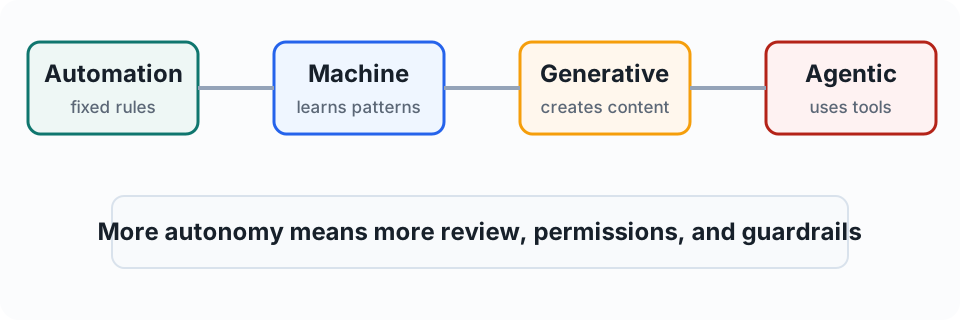
AutomationFollows fixed rules.
Machine LearningLearns patterns from data.
Generative AICreates new content.
Agentic AIUses AI plus tools to complete multi-step goals.
Comparison
Traditional Software vs AI
Traditional SoftwarePredictable rules, exact processes, same input usually gives same output.
AIPattern-based, flexible with messy inputs, useful for language and judgment support.
AI flexibility is useful, but it also means outputs need review.
Generative AI
What Generative AI Can Create
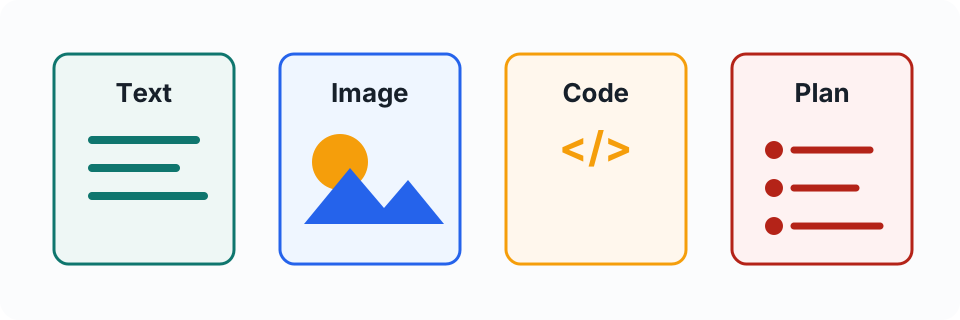
- Text, summaries, plans, and checklists
- Images, audio, and video
- Code and formulas
- Structured data from messy notes
- Drafts for emails, proposals, and reports
LLMs
What Is A Large Language Model?
A large language model is an AI model trained to process and generate language. It predicts useful continuations based on patterns learned from large amounts of text and code.
Treat it as a fast assistant that is strong at language and patterns, not as an all-knowing authority.
Mental Model
Useful Mental Model
Do not treat AI as an oracle. Treat it as a fast assistant that is strong at language and patterns, but still needs instructions, context, and checking.
The better the briefing, the better the result. The more important the output, the more you verify.
Strengths
Common Strengths
- Drafting and rewriting
- Summarizing and explaining
- Brainstorming options
- Classifying and extracting information
- Turning messy notes into clean structure
Limits
Common Weaknesses
- Confident mistakes
- Missing context
- Weak source tracking unless asked
- Bias and assumptions
- Sensitive data risk
- Poor judgment when goals are vague
Accuracy
Hallucinations
Hallucination means the AI produces something that sounds plausible but is wrong or unsupported.
Best defense: ask for sources, verify facts, and use AI as a draft partner rather than the final authority.
Prompting
Prompting Is Work Instruction
Better instructions usually produce better results. Prompting is less about magic words and more about clear delegation.
Role + task + context + constraints + output format + quality bar
Prompting
Prompt Formula
- Role: who should the AI act as?
- Task: what should it do?
- Context: what background matters?
- Constraints: what must it include or avoid?
- Format: what should the output look like?
- Quality bar: how should success be judged?
Weak Prompt
“Make This Better”
Problem: no audience, purpose, tone, constraints, or format.
A vague prompt delegates the thinking to the AI. That is how you get generic output.
Better Prompt
Add The Missing Context
Rewrite this client email to be clear and professional. Keep it under 120 words. Preserve all dates and numbers exactly. If something is unclear, list it under "Needs confirmation".
Prompting
Good Prompting Habits
- Be specific
- Provide context
- Give examples when style matters
- State constraints
- Request a format
- Ask for uncertainties
- Iterate
Workplace
Everyday AI Use Cases
- Email drafts and tone adjustments
- Meeting notes and action items
- Proposal outlines and client explanations
- SOPs, checklists, and training material
- Research summaries and spreadsheet help
Workflow
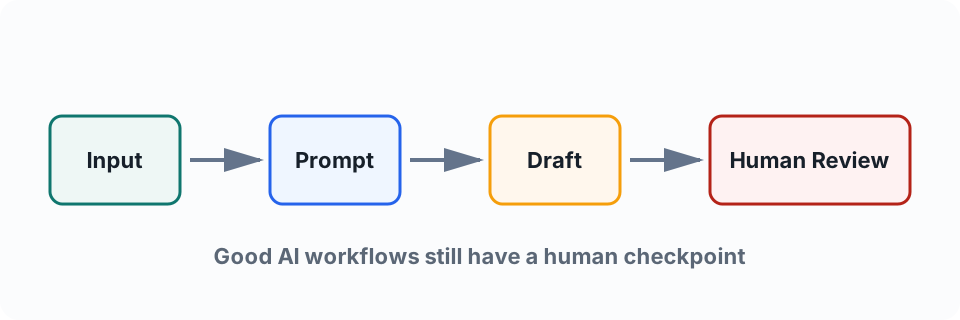
AI Workflow Template
- Input
- Prompt
- AI output
- Human review
- Final action
- Risk check
Coding
Do You Need Coding?
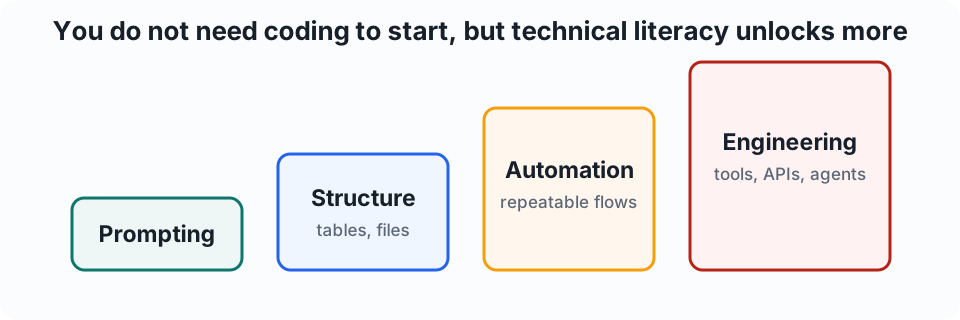
For general AI use: no. You can get strong results with plain language, good prompts, clear examples, and careful review.
The skill most people need first is clear communication, not Python.
Coding
When Coding Helps
- Connecting AI to company systems
- Automating repeatable workflows
- Building agents that call tools
- Handling structured data
- Debugging failures
- Setting permissions and guardrails
Coding
What Non-Coders Should Understand
- Inputs and outputs
- Basic data formats
- If-this-then-that logic
- How to verify results
- What data the AI can access
- What actions need approval
Mental Model
AI Is A Bit Like Excel
You do not need to be a software engineer to benefit. But the more you understand structure, formulas, and automation, the more useful and safer it becomes.
Types
Types Of AI And Their Uses
- Predictive AI: forecasts, scores, and classifications
- Generative text AI: emails, summaries, documents, reports
- Image, audio, and video AI: media creation and editing
- Code AI: scripts, debugging, documentation
- Search/research AI: sourced answers and summaries
- Agentic AI: multi-step workflows with tools
Examples
Where People Use AI
AIChat apps: ChatGPT, Claude, Gemini, Copilot
SRSearch: Perplexity, ChatGPT search, Gemini
OFOffice: Microsoft 365 Copilot, Gemini for Workspace
MDMedia: Firefly, Midjourney, Runway, Canva AI
CDCoding: Cursor, Copilot, Claude Code, Codex
LCLocal: Ollama, LM Studio, Hugging Face
Current Software
Current AI Software To Know
- Everyday chat: ChatGPT, Claude.ai, Gemini, Microsoft Copilot
- Search/research: Perplexity, ChatGPT search, Gemini research features
- Developer studios: Google AI Studio, OpenAI Platform, Anthropic Console, Azure AI Foundry
- Coding agents: OpenAI Codex, Claude Code, Cursor, GitHub Copilot
- Business agents: Copilot Studio, Gemini Enterprise, Zapier, n8n
- Media tools: Adobe Firefly, Midjourney, Runway, Canva AI
Teach categories first, then names. Product names change faster than the core workflow.
Current Examples
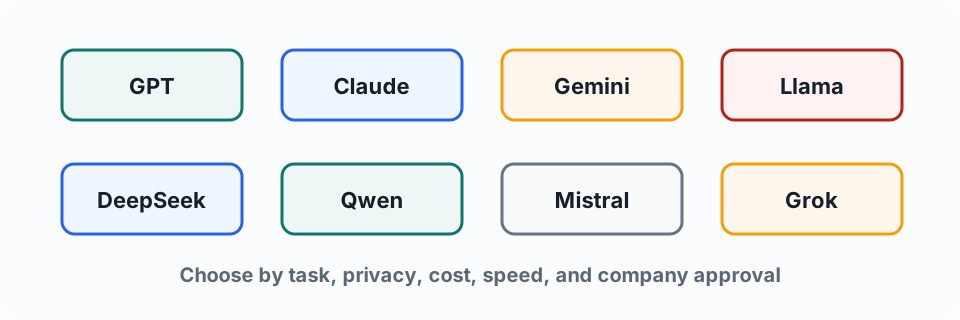
Popular LLM Families
Selection
How To Choose An LLM
- Task: writing, coding, reasoning, search, images, or documents
- Privacy: public app, approved enterprise tool, API, or local model
- Cost and speed
- Context length and file support
- Tool support and company approval
There is no single best model. Pick the model that fits the job and the risk.
Generative AI
Types Of Generative AI
- Natural language: writing, rewriting, summarizing, translating
- Conversational AI: chat and follow-up questions
- RAG: answers grounded in retrieved documents
- Multimodal AI: text, images, audio, video, and files together
- Structured output: tables, JSON, classification, extraction
- Agentic generation: planning plus tool use
Generative AI
Pattern Examples
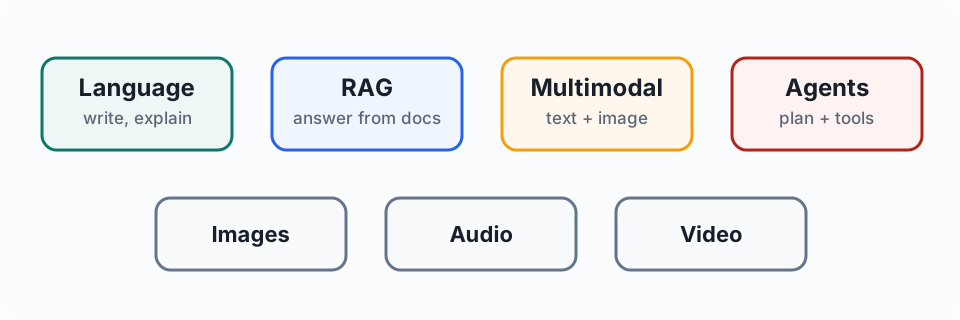
RAGAnswer from retrieved documents.
AgenticPlan, use tools, and ask for approval.
RAG
What Is RAG?
RAG means retrieval-augmented generation. The system retrieves relevant documents first, then asks the model to answer using that material.
Question
Search Docs
Retrieve
Generate
Answer
Use RAG for policy Q&A, product docs, support knowledge bases, and internal search.
Model Capabilities
Types Of LLM Capabilities
- Text/chat models: writing and analysis
- Reasoning or deep-thought models: harder planning, coding, math, decisions
- Vision-language models: images, screenshots, charts, PDFs
- Code models: software work and debugging
- Embedding models: search, matching, RAG
- Speech models: transcription and voice
- Local/small models: private or offline use
APIs
APIs And API Keys
An API lets software call an AI model without a human opening a chat app. An API key is the secret credential that allows access and often controls billing.
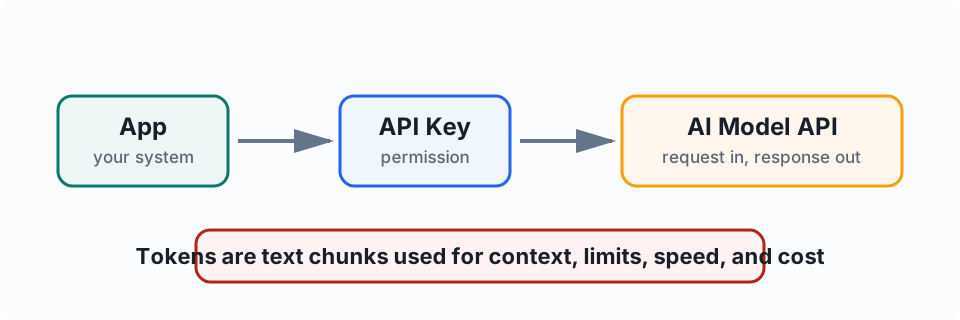
Treat API keys like passwords. Do not paste them into chat, commit them to GitHub, or share them in screenshots.
Tokens
What Is A Token?
A token is a chunk of text the model reads or writes. It is not exactly one word: long words can split into multiple tokens, and punctuation can count too.
- Input tokens: what you send to the model
- Output tokens: what the model generates back
- One English token is roughly 3-4 characters as a rough guide
Tokens
How Tokens Work
- Your prompt is split into input tokens
- The model processes those tokens inside its context window
- The model generates output tokens
- API billing often counts both input and output tokens
Tokens affect context length, cost, speed, and quality. Give enough context, but remove irrelevant clutter.
Agents
What Is Agentic AI?
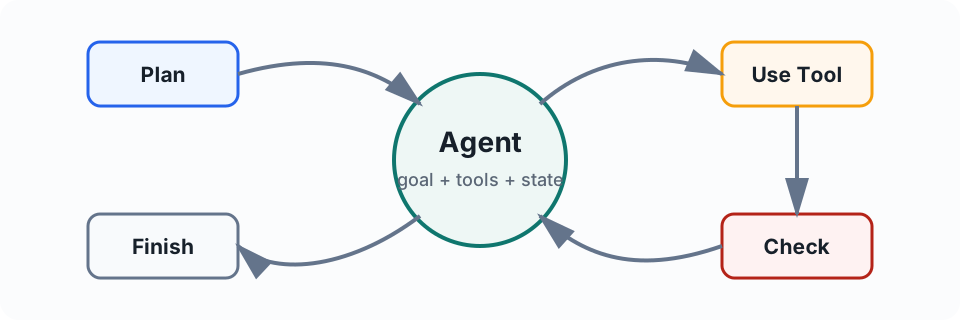
Agentic AI is AI that works through a goal over multiple steps, uses tools, keeps state, checks results, and continues until it finishes or needs help.
Agents
Chat vs Agent
ChatAsk a question. Get an answer.
AgentGive a goal. It plans, uses tools, reviews results, asks for approval, and completes the workflow.
Architecture
Agent Building Blocks
- Instructions
- Tools
- State or memory
- Guardrails
- Evaluation
- Human approval
Tools
Tool Use
Tools let an agent do things outside the model.
- Search, read files, or query a database
- Use a calculator or run code
- Create a ticket or draft an email
- Use a browser or internal app
- Follow a clear internal workflow as a custom tool
Tools do not have to be third-party apps. A repeatable workflow with inputs, outputs, and approval points can act like a tool.
Control
Human-In-The-Loop
Use human approval before sending messages, changing records, making purchases, deleting data, publishing content, or handling sensitive decisions.
Agents have a bigger blast radius than chat because they can take actions.
Example
Weekly Client Update Agent
- Read project notes
- Pull open tasks
- Draft status summary
- Flag risks and missing owners
- Ask for approval
- Send after approval
Notes
Tasks
Draft
Approve
Send
Good Fits
Where Agents Help
- Repetitive multi-step admin
- Research and reporting
- Customer support triage
- Internal knowledge lookup
- Project updates
- Data cleanup with review
Risk
Where Agents Are Risky
- High-stakes decisions
- Unreviewed external actions
- Sensitive data
- Legal, medical, financial, or HR decisions
- Poorly defined goals
- Systems with broad permissions
Current Examples
Common Agentic AI Tools
- ChatGPT with tools/agents: general task assistance
- Microsoft Copilot Studio: business process agents
- OpenAI Codex and Claude Code: agentic coding
- Cursor and GitHub Copilot: AI-assisted development
- Zapier and n8n: workflow automation with AI
- LangGraph, CrewAI, AutoGen: builder frameworks
Starting Point
Where To Start
- Beginners: approved ChatGPT, Claude, Gemini, or Copilot
- Microsoft-heavy teams: Copilot and Copilot Studio
- Software teams: Cursor, GitHub Copilot, Claude Code, Codex
- Private/local experiments: Ollama or LM Studio
- Business automation: Copilot Studio, Zapier, n8n
Agent Setup
How Users Can Set Up A Basic Agent
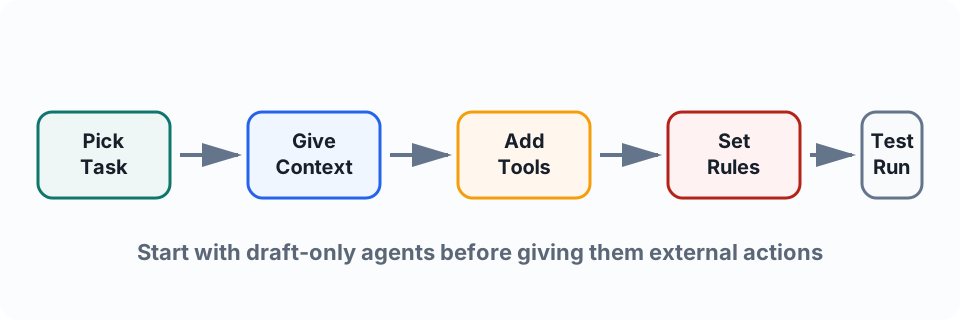
- Pick one recurring task with clear inputs and outputs
- Write the agent's job in plain language
- Give it examples, templates, and rules
- Connect only the tools it truly needs
- Test with low-risk data before using it for real work
Agent Setup
Beginner Setup Example
Use case: weekly internal project update assistant.
- Input: meeting notes, task list, project risks
- Agent task: draft a short update and flag missing owners
- Tools: file/document access only
- Approval: human reviews before sending
- Success: saves time without inventing commitments
Agent Setup
No-Code Ways To Start
- ChatGPT custom GPTs or project-style workspaces
- Claude projects and reusable instructions
- Microsoft Copilot Studio for business agents
- Zapier or n8n for app-to-app workflows
- CRM/helpdesk AI features already approved by the company
Start with agents that draft, summarize, classify, or prepare. Add external actions only after testing and approvals.
Agent Setup
Local vs Cloud Setup
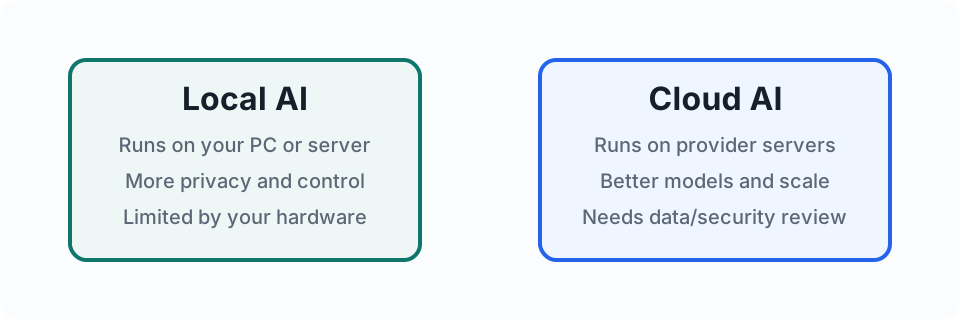
LocalBetter privacy/control, limited by your machine.
CloudBetter models/scale, needs data and billing controls.
Software
Common Local AI Software
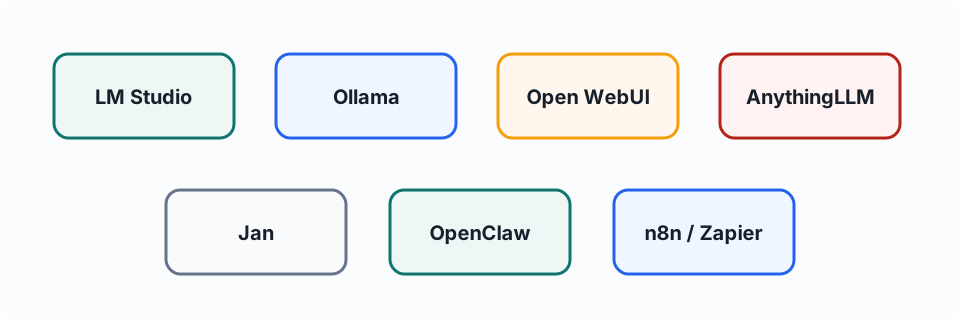
- LM Studio / Jan / AnythingLLM: beginner-friendly desktop apps
- Ollama: simple local model runner and API
- Open WebUI: browser UI for local/cloud model backends
- OpenClaw / Hermes / n8n / Zapier: workflow and agent harnesses
- Model choices such as Llama, Qwen, Mistral, or DeepSeek run inside these tools
Workflow
Beginner Local Agent Workflow
- Install LM Studio or Ollama
- Download a small model first, such as 3B-8B
- Test chat, summarizing, and document Q&A
- Add Open WebUI, AnythingLLM, or OpenClaw for workflows
- Keep external actions off until the results are reliable
Do not start with a 70B model or a fully autonomous agent. That is how beginners meet the wall at high speed.
Workflow
Beginner Cloud Agent Workflow
- Use an approved cloud tool: ChatGPT, Claude, Gemini, or Copilot
- Create reusable instructions or a project/workspace
- Add approved files or knowledge sources
- Ask it to draft, summarize, classify, or prepare work
- Require human approval before sending or changing records
Hardware
Hardware Priorities For Local LLMs
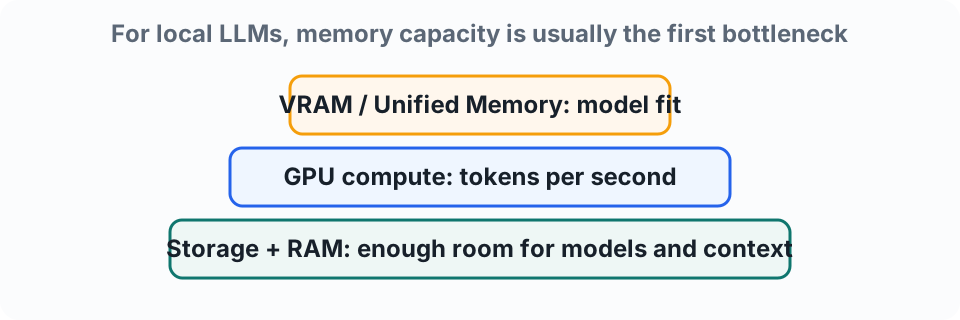
- Memory capacity decides what model/context can fit
- GPU compute affects speed once the model fits
- CPU and RAM keep the system usable and handle fallback
Hardware
Memory Sizing Rule Of Thumb
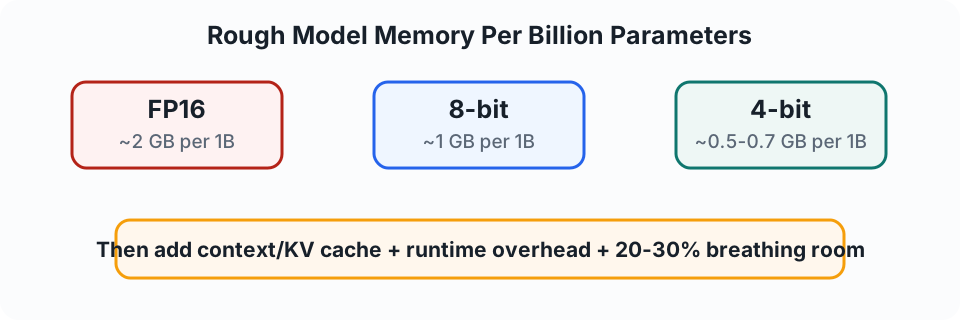
- FP16: about 2 GB per billion parameters
- 8-bit: about 1 GB per billion parameters
- 4-bit: about 0.5-0.7 GB per billion parameters
- Add context/KV cache, runtime overhead, and breathing room
Hardware
Practical Model Size Examples
- 7B at 4-bit: roughly 4-5 GB model file; 6-8 GB VRAM is a sensible floor
- 14B at 4-bit: roughly 8-10 GB; 12-16 GB VRAM feels more comfortable
- 32B at 4-bit: roughly 18-24 GB; 24 GB+ VRAM or larger UMA is preferred
- 70B at 4-bit: roughly 40-50 GB; think 48 GB+ VRAM or 64-128 GB unified memory
Fast shortcut: check the model file size, then add room for context and overhead.
Hardware
How Much Buffer To Keep?
- Keep 20-30% spare VRAM/unified memory when possible
- Context length uses extra memory through the KV cache
- The runtime also needs workspace memory
- If the GPU drives your display, reserve extra VRAM for the desktop
- System RAM still matters for OS, apps, documents, and CPU fallback
Yes, GPU VRAM needs its own buffer. CPU/system RAM buffer alone is not enough if you want smooth GPU inference.
Hardware
VRAM, RAM, And Overflow
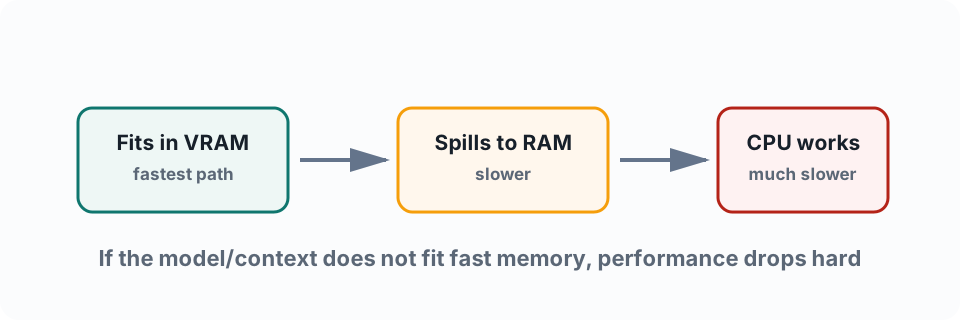
- If the model and context fit in VRAM/unified memory, it is much faster
- If not, layers spill into system RAM and CPU work increases
- It may still run, but speed can drop sharply
- Lowering context length or using a smaller/quantized model usually helps
Hardware
GPU, CPU Cores, And NPU
- GPU/VRAM usually matters most for comfortable local LLM use
- CPU cores help with loading, tokenization, fallback, and multitasking
- More cores do not fix too little memory
- NPUs are not widely used by most local LLM tools yet
- A CPU without an NPU can still run AI workloads well if the system has enough RAM and a compatible, powerful GPU with enough VRAM
- For beginners: prioritize memory, GPU compatibility, and VRAM before chasing NPU TOPS numbers
Hardware
UMA And Platform Choice
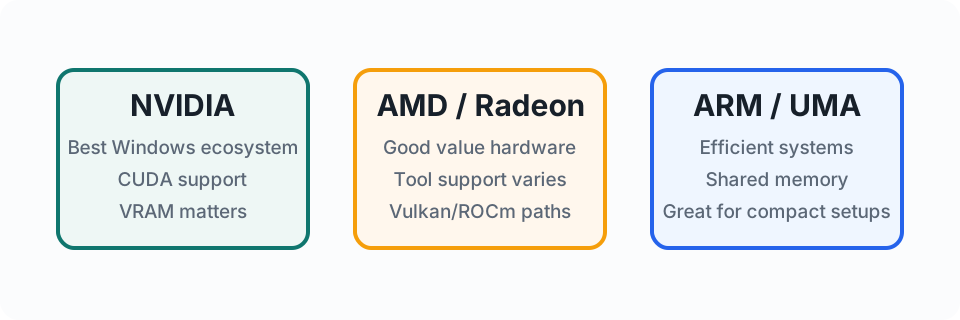
- UMA means CPU and GPU share one memory pool
- NVIDIA is usually easiest for Windows AI tooling because of CUDA
- AMD/Radeon can work well, but tool support varies more
- ARM/Apple-style systems can be efficient because of unified memory
Hardware
Mini PC Or Custom Build?
Mini PC / APUGood for learning, small models, demos, document assistants, and low power use.
Custom GPU PCBetter for larger models, faster responses, heavier agent workflows, and experimentation.
Cloud APIBest when you need strong models immediately and can manage data/billing controls.
Practical RuleBuy for the model size and privacy need, not for benchmark bragging rights.
Agent Setup
Agent Safety Checklist
- What data can it read?
- What actions can it take?
- Where must it ask for approval?
- How are outputs checked?
- Where are logs kept?
- Who owns mistakes and maintenance?
Responsible AI
Responsible AI Basics
- Verify important facts
- Protect private data
- Check for bias
- Keep people accountable
- Use approved tools
- Record decisions where needed
Security
Security Basics
- Do not paste secrets
- Remove unnecessary personal data
- Limit tool permissions
- Log actions
- Require approval for external actions
- Watch for prompt injection
Security
Guardrails In Practice
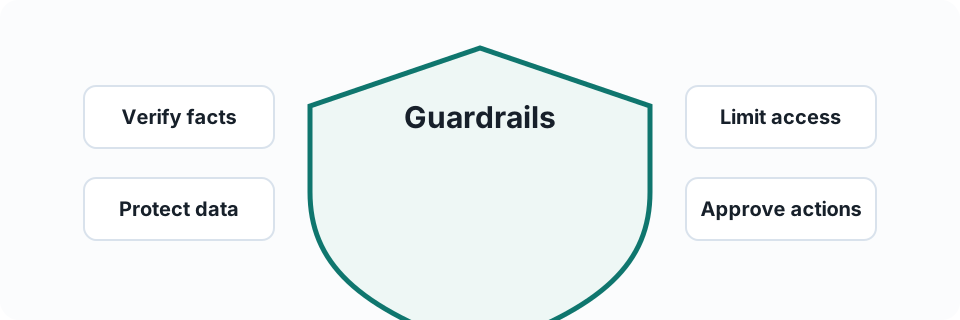
VerifyFacts, names, numbers, and claims.
ApproveExternal sends and record changes.
Recommendation
Recommended Adoption Roadmap
- Start with approved AI for personal productivity
- Standardize team prompts and review rules
- Pilot narrow agentic workflows in draft-only mode
- Add tools with least privilege
- Require approval before external or sensitive actions
- Track value, errors, and ownership
Pilot
Pilot Before Automation
Good first pilotClear recurring task, low-risk data, human-reviewed output, named owner, logs, and a success metric.
Bad first pilotBroad access, vague goals, no owner, and automatic external actions.
Activity
Team Exercise
Pick one workflow. Design an AI-assisted version.
- Trigger, inputs, AI task
- Human review and output
- Risks and success metric
Trigger
Inputs
AI Task
Review
Metric
Wrap-Up
Key Takeaways
- AI is a practical work tool, not magic
- Prompting is clear delegation
- You do not need coding for basic AI use
- Agents are multi-step AI systems with tools
- The more an AI can do, the more guardrails it needs